
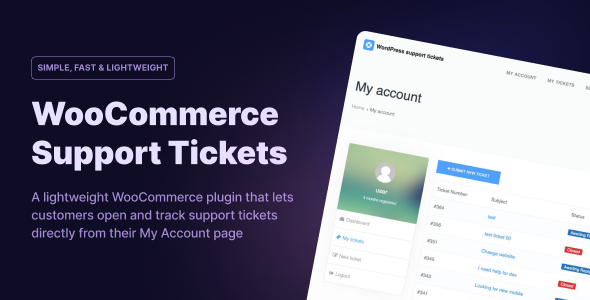
NikanTicket es un sistema de tickets de soporte liviano y confiable diseñado para simplificar la comunicación con el cliente en WordPress. Con una perfecta integración de WooCommerce, ofrece a los clientes una forma estructurada de enviar solicitudes y permite a su equipo administrar y responder desde el panel de WordPress: la solución perfecta de asistencia técnica de WooCommerce.
Permita que los usuarios envíen tickets de soporte ilimitados en cualquier momento. Ideal para gestionar preguntas sobre productos, resolución de problemas o cualquier consulta de cliente directamente desde su cuenta.
Cree y administre categorías de tickets para mantener organizadas las solicitudes de soporte. Ayude a su equipo a responder más rápido agrupando tickets por tema.
Configure departamentos como Ventas, Facturación o Soporte técnico. Enrute cada ticket al equipo correspondiente para mejorar el tiempo de resolución y la satisfacción del usuario.
Agregue niveles de prioridad personalizados, como Bajo, Medio y Urgente, para ayudar a su equipo a manejar los tickets más importantes primero.
Gestionar las solicitudes de los clientes puede ser un desafío para cualquier tienda en línea. Por eso es importante elegir la herramienta adecuada. NikanTicket es más que un simple complemento: es un completo sistema de tickets de soporte para WooCommerce creado directamente para WordPress.
A diferencia de los servicios externos, este Complemento de soporte técnico de WordPress mantiene todo dentro de su propio sitio, brindándole control total sobre los datos y el flujo de trabajo. Los clientes pueden enviar tickets desde la página de su cuenta de WooCommerce, mientras su equipo responde rápidamente desde el panel de WordPress.
Para propietarios de tiendas que buscan mejorar atención al cliente para WooCommerceNikanTicket ofrece el equilibrio perfecto entre simplicidad y funciones avanzadas, que incluyen tickets, departamentos, archivos adjuntos y notificaciones por correo electrónico ilimitados.
Versión 1.13.8
- The issue with attachments not opening on some sites has been resolved
- An internal notification system has been added, allowing users to see new replies automatically when they log in.
- Admins or support operators can now create tickets for users, and an email template has been added to the plugin settings.
- The issue with the user profile link displaying when creating a new ticket has been fixed.
- The issue with filtering users in the ticket list, which wasn’t displaying properly, has been resolved.
Versión 1.11.5
- Plugin compatibility with PHP 8
- The addition of the ‘View Tickets’ link in the Ticket Details box for quick access to all tickets of a user
- The ability to view ticket attachments for other staff members added to the ticket.
- Fixing the issue of the reply edit window not opening.
- Addressing some of the reported errors.
Versión 1.6.2
- Smart loading of plugin JS/CSS files only on support ticket related pages
- Added Bootstrap 5 skin to the plugin
- The addition of a dedicated skin named Nikan for sites that do not intend to use Bootstrap
- The possibility of assigning a ticket to several people to be notified of ticket announcements
- The possibility of assigning users to email notification templates separately, to be updated with notifications in the plugin settings.
- Adding a link to view the user's profile and orders (WooCommerce) in the ticket for support staff
- Automatic registration of settings related to WooCommerce after activating the plugin
- Fixed some errors in the plugin template system and access levels
Versión 1.8.3
- Fixing the problem of displaying the categories, priorities, and departments drop-down form when sending a new support ticket.
- Attachments will open in a new window
- Display the button to send a support ticket in the order list and details of the WooCommerce order
NikanTicket es un sistema de tickets de soporte liviano y confiable diseñado para simplificar la comunicación con el cliente en WordPress. Con una perfecta integración de WooCommerce, ofrece a los clientes una forma estructurada de enviar solicitudes y permite a su equipo administrar y responder desde el panel de WordPress: la solución perfecta de asistencia técnica de WooCommerce.
Permita que los usuarios envíen tickets de soporte ilimitados en cualquier momento. Ideal para gestionar preguntas sobre productos, resolución de problemas o cualquier consulta de cliente directamente desde su cuenta.
Cree y administre categorías de tickets para mantener organizadas las solicitudes de soporte. Ayude a su equipo a responder más rápido agrupando tickets por tema.
Configure departamentos como Ventas, Facturación o Soporte técnico. Enrute cada ticket al equipo correspondiente para mejorar el tiempo de resolución y la satisfacción del usuario.
Agregue niveles de prioridad personalizados, como Bajo, Medio y Urgente, para ayudar a su equipo a manejar los tickets más importantes primero.
Gestionar las solicitudes de los clientes puede ser un desafío para cualquier tienda en línea. Por eso es importante elegir la herramienta adecuada. NikanTicket es más que un simple complemento: es un completo sistema de tickets de soporte para WooCommerce creado directamente para WordPress.
A diferencia de los servicios externos, este Complemento de soporte técnico de WordPress mantiene todo dentro de su propio sitio, brindándole control total sobre los datos y el flujo de trabajo. Los clientes pueden enviar tickets desde la página de su cuenta de WooCommerce, mientras su equipo responde rápidamente desde el panel de WordPress.
Para propietarios de tiendas que buscan mejorar atención al cliente para WooCommerceNikanTicket ofrece el equilibrio perfecto entre simplicidad y funciones avanzadas, que incluyen tickets, departamentos, archivos adjuntos y notificaciones por correo electrónico ilimitados.
Versión 1.13.8
- The issue with attachments not opening on some sites has been resolved
- An internal notification system has been added, allowing users to see new replies automatically when they log in.
- Admins or support operators can now create tickets for users, and an email template has been added to the plugin settings.
- The issue with the user profile link displaying when creating a new ticket has been fixed.
- The issue with filtering users in the ticket list, which wasn’t displaying properly, has been resolved.
Versión 1.11.5
- Plugin compatibility with PHP 8
- The addition of the ‘View Tickets’ link in the Ticket Details box for quick access to all tickets of a user
- The ability to view ticket attachments for other staff members added to the ticket.
- Fixing the issue of the reply edit window not opening.
- Addressing some of the reported errors.
Versión 1.6.2
- Smart loading of plugin JS/CSS files only on support ticket related pages
- Added Bootstrap 5 skin to the plugin
- The addition of a dedicated skin named Nikan for sites that do not intend to use Bootstrap
- The possibility of assigning a ticket to several people to be notified of ticket announcements
- The possibility of assigning users to email notification templates separately, to be updated with notifications in the plugin settings.
- Adding a link to view the user's profile and orders (WooCommerce) in the ticket for support staff
- Automatic registration of settings related to WooCommerce after activating the plugin
- Fixed some errors in the plugin template system and access levels
Versión 1.8.3
- Fixing the problem of displaying the categories, priorities, and departments drop-down form when sending a new support ticket.
- Attachments will open in a new window
- Display the button to send a support ticket in the order list and details of the WooCommerce order

¡Obtén acceso instantáneo a tas las descargas exclusivas! 😎 Con una suscripción mensual de solo $16.50/USD. ¡No te pierdas esta oportunidad! Regístrate ahora y comienza a descargar todo lo que necesitas para llevar tu proyecto al siguiente nivel. 💪